Set Up an AirTag to Track Your Things
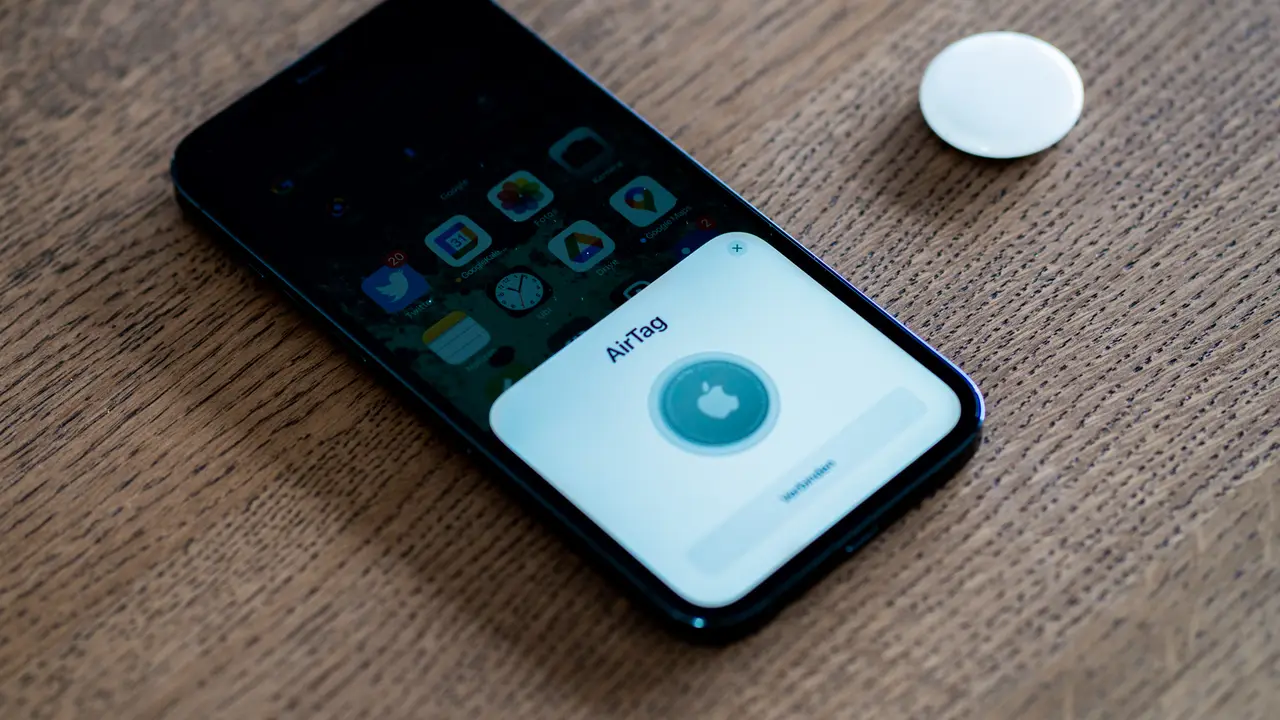
Pair an AirTag with your iPhone in Find My, then use Precision Finding to locate keys, bags, and more down to the exact spot.
8 min
62 articles
Step-by-step guides that walk you from broken to fixed.
Pair an AirTag with your iPhone in Find My, then use Precision Finding to locate keys, bags, and more down to the exact spot.
Block ads and trackers on every device in your home with Pi-hole on a Raspberry Pi, a network-wide DNS filter set up in 20 minutes.
Get tear-free, stutter-free gaming by enabling variable refresh rate on your monitor, GPU, and games the right way on Windows 11.
Get an iPhone charging again by cleaning the port, swapping the cable, force restarting, and checking the Charge Limit setting.
Stop Chrome crashing on launch or mid-session by disabling hardware acceleration, clearing a bad profile, and removing rogue extensions.
Make a 1080p and a 4K monitor look right together on Windows 11 by setting per-monitor scaling so text stays the same physical size.
A dirty port stops most iPhones from charging; clean it safely, then work through cable, adapter, and liquid-detection checks.
Automate your smart home with SmartThings routines that trigger lights, thermostats, and security on a schedule, sensor, or voice command.
Get your missing 5 GHz Wi-Fi band back by enabling the radio, fixing the channel, splitting bands, and updating Wi-Fi drivers.
Get a stubborn smart plug online by forcing 2.4GHz Wi-Fi, moving closer for setup, and resetting it cleanly.
Get CarPlay working again by using a real data cable, enabling the right Siri settings, and re-pairing the car.
Get a Kindle back online by ruling out 6GHz and WPA3 issues, restarting, syncing your library, and re-registering the device.
Cool down a hot Samsung Galaxy fast and prevent it long-term with charging, background-app, and brightness fixes for summer 2026.
Cumulative updates failing with 0x80073712 or 0x800f0993 on upgraded Windows 11 PCs? Here is the official DISM fix, step by step.
Track your nights with Apple Watch by setting a sleep schedule, enabling Sleep Focus, and reading the sleep stages in the Health app.
Restore Bluetooth on Windows 11 by restarting the support service, refreshing drivers, and re-pairing your device.
Recover from a Windows 11 black screen after sign-in by restarting graphics and Explorer, using Safe Mode, or removing a bad update.
Protect every device on your network at once by running a VPN on your router, with WireGuard for the best speed on home hardware.
Diagnose slow or failed Android charging by cleaning the port, checking the charger wattage, and testing in Safe Mode.
Get an HP printer back on Wi-Fi by forcing it onto the 2.4 GHz band, resetting network defaults, and updating firmware.
Battery tanking after updating to iOS 26? Here is why it happens and the settings changes that actually slow the drain.
Stop the camera black screen in Teams and Zoom by fixing permissions, freeing the locked camera, and switching the capture method.
Get back deleted files on Windows 11 using the Recycle Bin, File History previous versions, and the free Windows File Recovery tool.
Install Ubuntu next to Windows 11 safely with this dual-boot guide, including the BitLocker and Fast Startup steps that prevent data loss.
Cut Chrome's RAM appetite with Memory Saver, the built-in Task Manager, and a quick extension cleanup.
Rescue a macOS Tahoe update that's frozen on the progress bar by freeing space, deleting the bad installer, and using Safe Mode.
Resolve the 'You need a WIA driver' error and stuck scans by restarting the WIA service, reinstalling drivers, and resetting the Scan app.
Get past Android's 'obtaining IP address' loop by forgetting the network, fixing MAC randomization, or assigning a static IP.
Sharpen Garmin GPS tracks by refreshing satellite data, choosing the right GNSS mode, turning off UltraTrac, and calibrating sensors.
Tame the WindowServer process on macOS by cutting visual effects, checking displays, and disabling iPhone Mirroring.
Schedule internet access, block sites, and filter content for every device by configuring parental controls on your home router.
PS5 or Xbox showing no signal, black screen, or flicker at 4K 120Hz? Here are the cable, console, and TV fixes for HDMI 2.1 signal drops.
Stop AirPods from refusing to pair or jumping to the wrong device with a clean reset, the right Bluetooth setting, and matched software.
Stop random Wi-Fi drops by splitting your 2.4GHz and 5GHz bands, fixing channels, and taming band steering.
Reclaim gigabytes safely with Storage Sense, Disk Cleanup, and a proper WinSxS clean-up, without breaking your install.
Get a pro-looking video call or stream by turning your DSLR or mirrorless camera into a webcam with a capture card or USB utility.
Stop the 'Printer Offline' status on Windows 11 by clearing the offline flag, restarting the spooler, and refreshing drivers.
Synology NAS missing from Windows File Explorer? Enable SMB and WS-Discovery, fix Windows network discovery, and map the drive directly to get it back.
Recover an unbootable Ubuntu by booting an older kernel from GRUB, then repairing packages or reinstalling GRUB from a live USB.
Get Windows 11 Search typing, opening, and returning results again by restarting the service, rebuilding the index, and repairing system files.
Get whole-home coverage from a mesh Wi-Fi system by placing nodes correctly, the single factor that makes or breaks performance.
Slow boot? Disabling startup apps fixes most cases for free. Here is how to cut Windows 11 boot time in a few minutes.
Turn on the Linux development environment on ChromeOS to install real desktop apps like code editors, GIMP, and LibreOffice.
Get Windows 11 to recognize a second display with cable checks, a forced detect, the graphics-reset shortcut, and a driver refresh.
Set up Tailscale to reach your home network from anywhere with no port forwarding, using an encrypted WireGuard mesh, MagicDNS, and subnet routing.
Stop a thief who knows your passcode from draining accounts by turning on iPhone Stolen Device Protection and its security delay.
Stop key chatter and double letters by cleaning switches, raising debounce time, or adding a software filter, ordered from easy to permanent.
Printer leaving lines or streaks across the page? Here are the inkjet and laser fixes, from cleaning cycles to drum checks, that clear it up.
Deleted a photo on Android? Here is how to restore it from the Google Photos trash, the device bin, and even after permanent deletion.
Replace a failed drive and repair a degraded Synology storage pool in DSM 7 without losing data, step by step.
Use Time Machine to back up your Mac wirelessly to a Synology or other NAS over SMB, the right way on modern macOS.
Stream SteamVR and PC games to your Quest 3 wirelessly with Air Link, or plug in over USB for the lowest latency.
Get your Apple Watch pairing again by fixing version mismatches, resetting the watch, and clearing a stuck pairing in watchOS 26.
Ring, Nest, or Wyze doorbell keeps dropping offline? Here are the Wi-Fi, power, and signal fixes that keep your video doorbell connected for good.
Logitech mouse not connecting over Bolt, Unifying, or Bluetooth? Identify your receiver type and follow the right re-pairing steps to fix it fast.
Send EPUB and PDF files to your Kindle wirelessly with Send to Kindle, or sideload over USB with Calibre when files are too big.
A practical 2026 guide to building a Matter and Thread smart home, choosing a Thread border router, and avoiding fragmented Thread islands.
Add wireless Android Auto to a wired-only car with a USB dongle, and fix the first-connection failures that trip most people up.
Get accurate color and proper HDR from any 4K TV by switching to the right picture mode and turning off the settings that ruin the image.
Set up Art Mode on Samsung The Frame and fix the black screen caused by Night Mode and motion sleep so your art stays on display.
Sonos app showing 'No products found' or speakers missing? Here is the fast, ordered fix for connection and setup failures in the new Sonos app.
Turn your Synology NAS into a free, self-hosted streaming server with Jellyfin in Container Manager, including hardware transcoding.